Skip to content

How Boilie Maker Studio Works

The complete bait formulation and production platform.

Ingredient Catalog

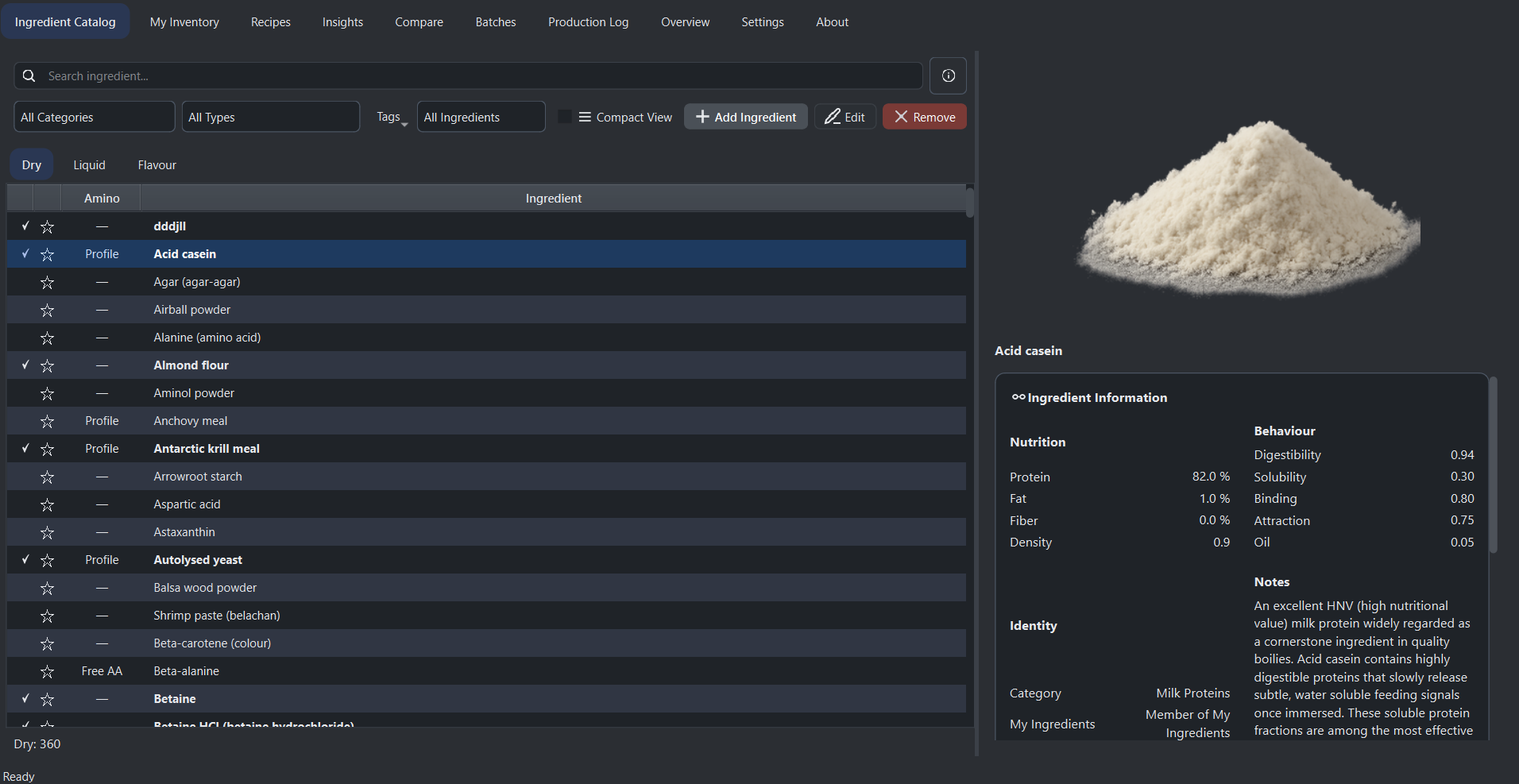
The Ingredient Catalog is the central database of all ingredients available in Boilie Maker Studio.

Ingredients are loaded automatically at startup from a predefined catalog together with any previously saved custom ingredients. The catalog is organized into three groups: dry, liquid, and flavour, which can be accessed through dedicated tabs for easier navigation.

How it works

You can use the search bar to quickly find ingredients by name or browse them by switching between the Dry, Liquid, and Flavour tabs. Selecting an ingredient displays its detailed information in the side panel, allowing you to better understand its properties. Double-clicking an ingredient instantly adds it to your inventory, enabling a fast and efficient workflow between catalog and stock management.

Smart behavior

Ingredients that are already present in your inventory are visually highlighted, making it easy to identify what is currently available. The Compact View option allows more ingredients to be displayed on screen at once, improving navigation when working with large ingredient lists. Filtering and browsing are optimized for speed to support efficient formulation work.

Custom ingredients

If a required ingredient is not available in the catalog, you can add a new custom ingredient. These user-added ingredients can be edited or removed later, while the built-in catalog remains unchanged and protected to ensure consistency and reliability.

Workflow integration

Ingredients selected in the catalog are used throughout the entire application, including Inventory, Recipes, and Production. The direct connection between these systems allows for a smooth workflow, where ingredients can be quickly transferred and reused without duplication.

The Ingredient Catalog provides a structured and reliable foundation for bait formulation while still allowing flexibility through custom ingredient additions.

Inventory

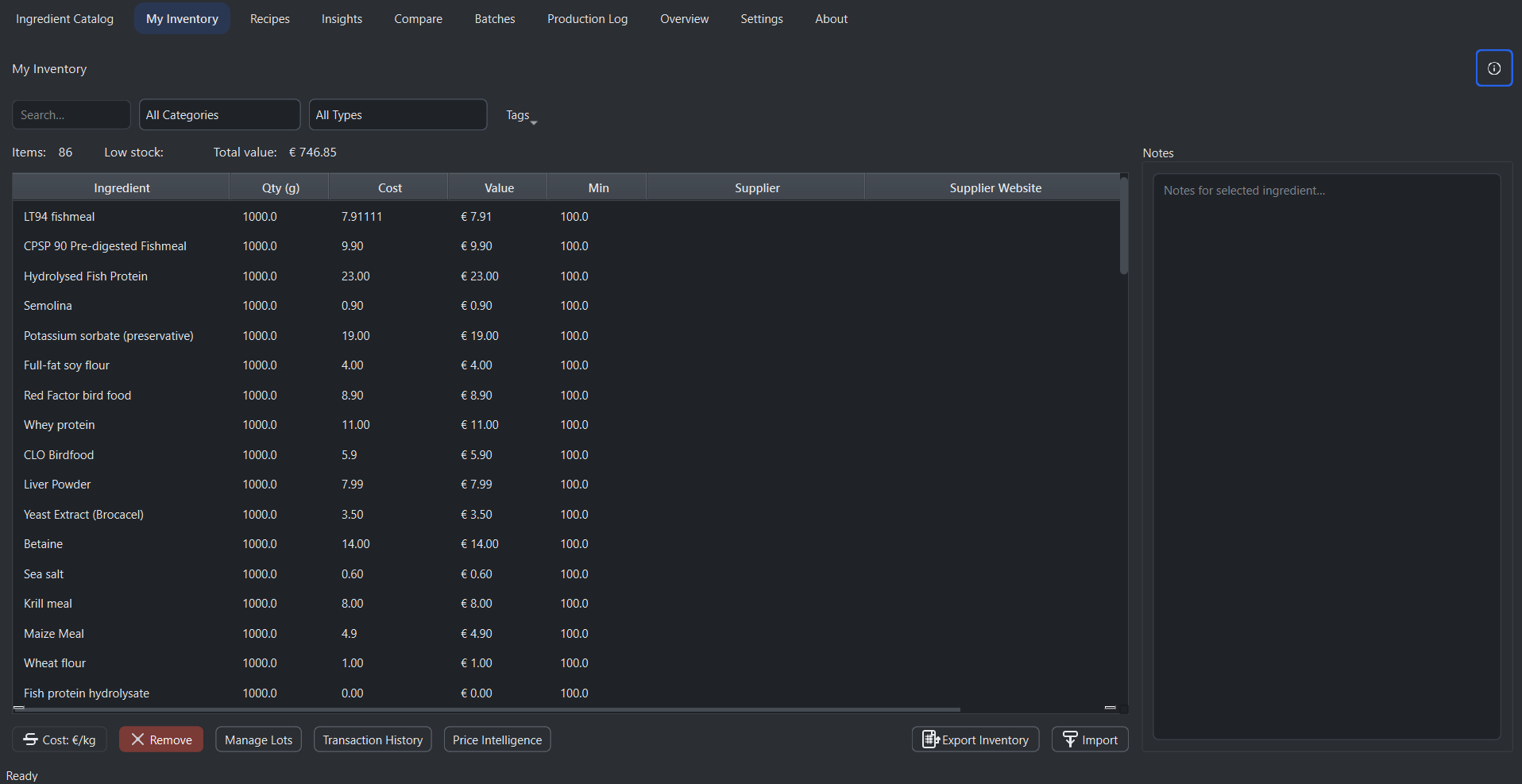
The Inventory system tracks all ingredients currently available in your stock and connects directly to recipes, batch production, and cost calculations.

Ingredients are added to the inventory from the Ingredient Catalog and become part of your working stock. Each entry represents a real ingredient you have available for formulation and production.

How it works

Within the inventory table, you define the quantity of each ingredient together with its cost. Quantities are stored in grams or milliliters depending on the ingredient, while cost can be entered either per gram or per kilogram using the cost toggle. The system automatically converts and stores values consistently, ensuring accurate calculations across the application.

You can also define a minimum stock level for each ingredient. When the available quantity drops below this level, the row is visually highlighted to indicate low stock or depletion. This allows you to quickly identify which ingredients need to be replenished.

Data and workflow

Each inventory item can include additional information such as supplier name, supplier website, and notes. The website field is interactive and allows you to open supplier pages directly from the application, while the notes panel can be used to store any relevant information such as storage conditions, batch details, or quality observations.

The inventory is tightly integrated with batch production. When a batch is produced, ingredient quantities are automatically deducted from the inventory. If there is not enough stock available, the system prevents production from proceeding, ensuring that all calculations remain realistic and consistent with actual resources.

Automation and overview

The system continuously calculates the total value of each ingredient based on its quantity and cost, as well as the total value of the entire inventory. It also tracks the number of items in stock and the number of low stock ingredients, providing a quick overview of your current inventory status.

A built-in search function allows you to filter and locate ingredients quickly, making it easier to manage larger inventories. Additional productivity features such as keyboard shortcuts and undo functionality support efficient workflow during editing.

Import and export

Inventory data can be exported to Excel or CSV formats for reporting, backups, or external use. The Excel export includes a structured report with calculated values and summary information. Inventory can also be imported from CSV or Excel files, allowing you to restore or update your stock data easily.

The Inventory system ensures that your bait formulation is always based on real, measurable data, linking ingredient availability, cost, and production into a single controlled workflow.

Recipes

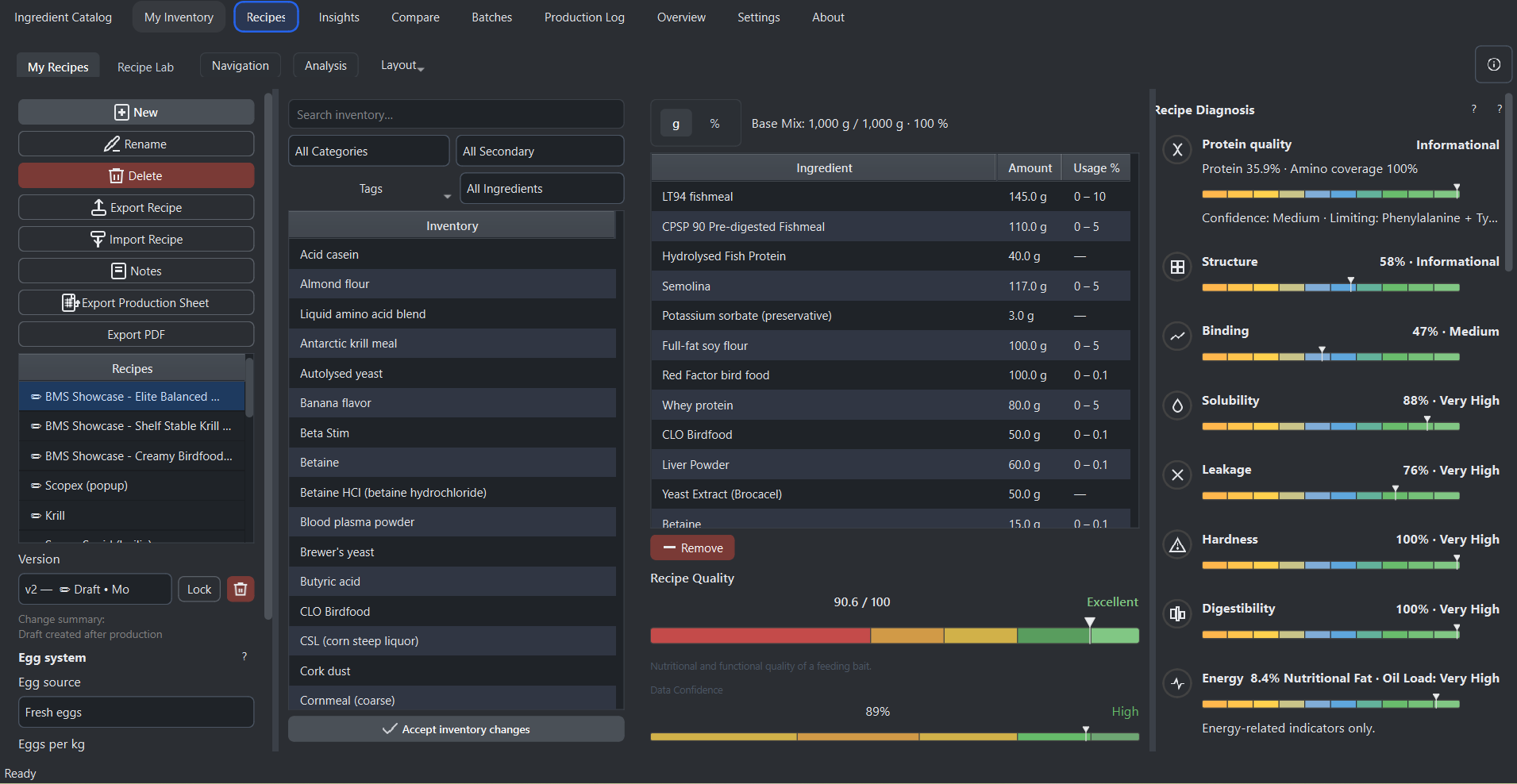
The Recipes tab is the core of Boilie Maker Studio, where bait formulations are created, edited, and prepared for production. Each recipe represents a complete mix defined per kilogram and is directly connected to your inventory, costs, and performance analysis.

Recipes are built by adding ingredients from your inventory. Ingredients are inserted directly into the recipe table and can be adjusted in either grams or percentage mode. The system automatically recalculates totals, hydration, and performance values in real time as changes are made.

How it works

Recipes are organized into families with version control. Every recipe has an active version that can be edited, while production-approved versions are locked to preserve consistency. When changes are made after production, a new draft version is automatically created, ensuring that previous formulations remain unchanged and traceable.

Ingredients are added by double-clicking items from the inventory panel. Once added, their quantities can be adjusted directly in the table. The system supports both gram-based input and percentage-based formulation, where percentages are calculated relative to the dry mix. The final dry mix is always normalized internally to maintain formulation consistency.

Hydration and dough control

Hydration defines the liquid-to-dry ratio of the recipe and is automatically calculated from liquid ingredients, eggs, and additional water. A dedicated slider allows precise adjustment of hydration, while preset values adapt dynamically based on bait type, including boilies, wafters, and popups.

The system continuously evaluates hydration and provides feedback on whether the mix is too dry, optimal, or too wet. This directly affects dough behavior, rolling properties, and final bait structure.

Scaling and production

Recipes can be scaled to any batch size without changing the underlying formulation. The scale factor is calculated automatically, and all ingredient amounts are adjusted accordingly while preserving the original ratios. This ensures consistent results across different production volumes.

Once a recipe is ready, a production version can be locked. Locked versions cannot be edited and are used for batch production and export. This guarantees repeatability and protects production data from accidental changes.

Inventory integration

Recipes are directly linked to inventory data. Ingredient costs, availability, and units are automatically reflected in the recipe. If inventory data changes, the recipe is marked as outdated and requires confirmation before further use. This ensures that all calculations remain accurate and up to date.

Cost and performance analysis

The system calculates total cost per kilogram as well as batch cost when scaling is applied. It also identifies cost drivers by highlighting the most expensive ingredients in the formulation.

In addition, the recipe is analyzed using the Intelligence Engine, which evaluates structure, solubility, digestibility, hardness, and overall performance. These metrics are combined into a final recipe performance score, providing a clear indication of formulation quality.

Advanced behavior analysis

Recipes include real-time diagnostics such as hydration status, dough hardness prediction, nutritional breakdown, and bait behavior analysis. For popups and wafters, buoyancy behavior is simulated based on ingredient composition and liquid load, helping predict how the bait will perform in water.

These insights do not modify the recipe but provide guidance for optimization and improvement.

Export and production workflow

Recipes can be exported as professional production sheets in Excel format. The export includes ingredient quantities, scaling, percentages, and cost calculations, making it suitable for real-world manufacturing and documentation.

The Recipes tab connects formulation, analysis, and production into a single workflow, allowing you to move from idea to finished bait with full control and consistency.

Insights

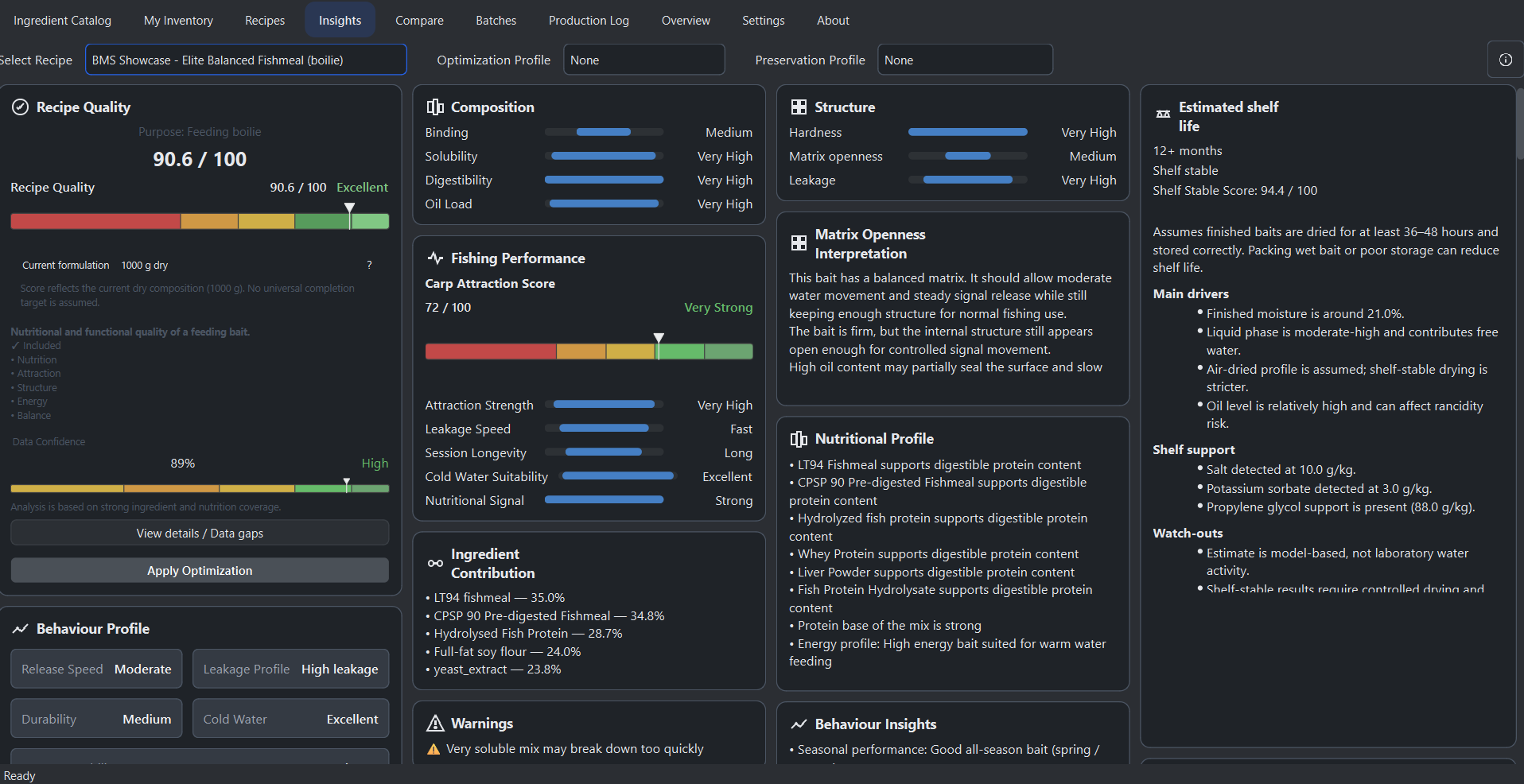
The Insights tab is the analytical core of Boilie Maker Studio. It evaluates a selected recipe using the built-in Intelligence Engine and presents a complete breakdown of structure, behaviour, performance, and optimization potential.

A single recipe is selected from the dropdown, and all insights update instantly based on the current formulation and selected optimization profile. The system does not modify the recipe automatically. It analyzes it and provides structured feedback for improvement.

Intelligence Engine

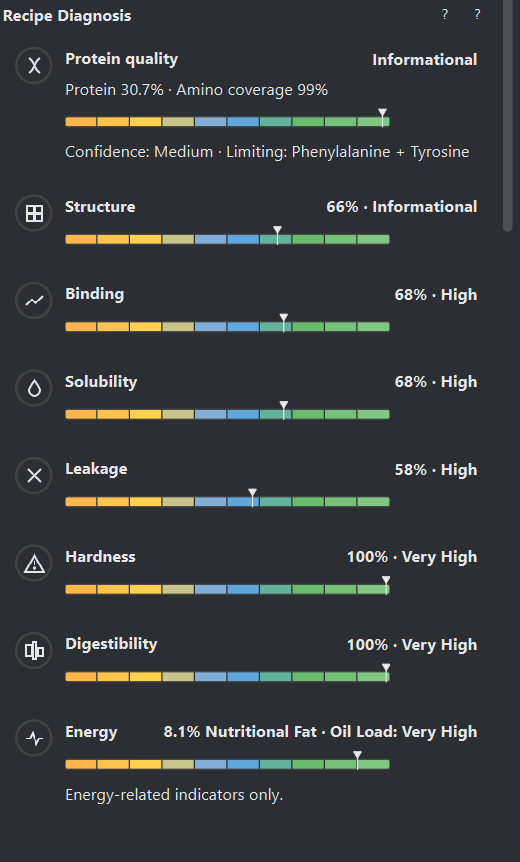
At the core of the Insights tab is the Intelligence Engine, which evaluates each ingredient based on functional properties such as binding strength, solubility, digestibility, oil content, leakage potential, density, and buoyancy influence.

Instead of treating ingredients as simple percentages, the system understands how they behave in a bait mix. This allows it to simulate real-world performance and interactions between ingredients, producing meaningful and actionable analysis.

Scoring system

At the top of the tab, the primary score represents the overall performance of the recipe. For boilies, this is displayed as Recipe Quality, while for popups and wafters it reflects performance or balance depending on bait type.

The score is calculated using multiple weighted factors including binding strength, solubility, digestibility, leakage, hardness, and bait-type-specific physics. The result is normalized to a 0–100 scale and classified into performance tiers such as Average, Good, Very Good, and Elite.

Composition and structure analysis

The Composition card shows core functional properties of the mix, including binding, solubility, digestibility, oil content, and buoyancy for surface baits. These values are derived from ingredient intelligence and reflect how the mix behaves physically and nutritionally.

The Structure card evaluates hardness, leakage, and stability. Stability is calculated from bait physics and indicates how the bait maintains integrity over time, particularly for popups and wafters.

Recipe DNA

Recipe DNA represents the functional composition of the mix by grouping ingredients into categories such as protein sources, binders, cereals, birdfoods, solubles, oils, fibers, and additives.

Each group is displayed as a percentage contribution, allowing you to understand the structural identity of the bait. The system also generates an interpretation of the DNA, describing whether the mix is protein-heavy, binder-dominant, soluble-driven, or balanced.

Behaviour and performance

For boilies, the Behaviour card describes breakdown speed, leakage profile, hardness, and seasonal performance. It also includes a simplified attraction release curve showing how the bait behaves over time in water.

Fishing Performance evaluates how effective the bait is from a carp fishing perspective. It combines attraction strength, leakage speed, session longevity, cold-water suitability, and nutritional signal into a single attraction score.

Bait physics simulation

For popups and wafters, the Behaviour card is replaced with a physics simulation panel. This system models buoyancy, density, and balance over time using a soak simulation.

A time slider allows you to simulate how the bait behaves after hours in water. This makes it possible to predict whether a popup will hold lift or whether a wafter will remain critically balanced.

Ingredient contribution and diagnostics

The system identifies the most influential ingredients in the recipe and shows their percentage contribution. This helps understand which components dominate the formulation.

Additional diagnostic cards highlight warnings, conflicts, structural issues, and formulation imbalances. These insights are generated from ingredient interactions and recipe composition.

Optimization system

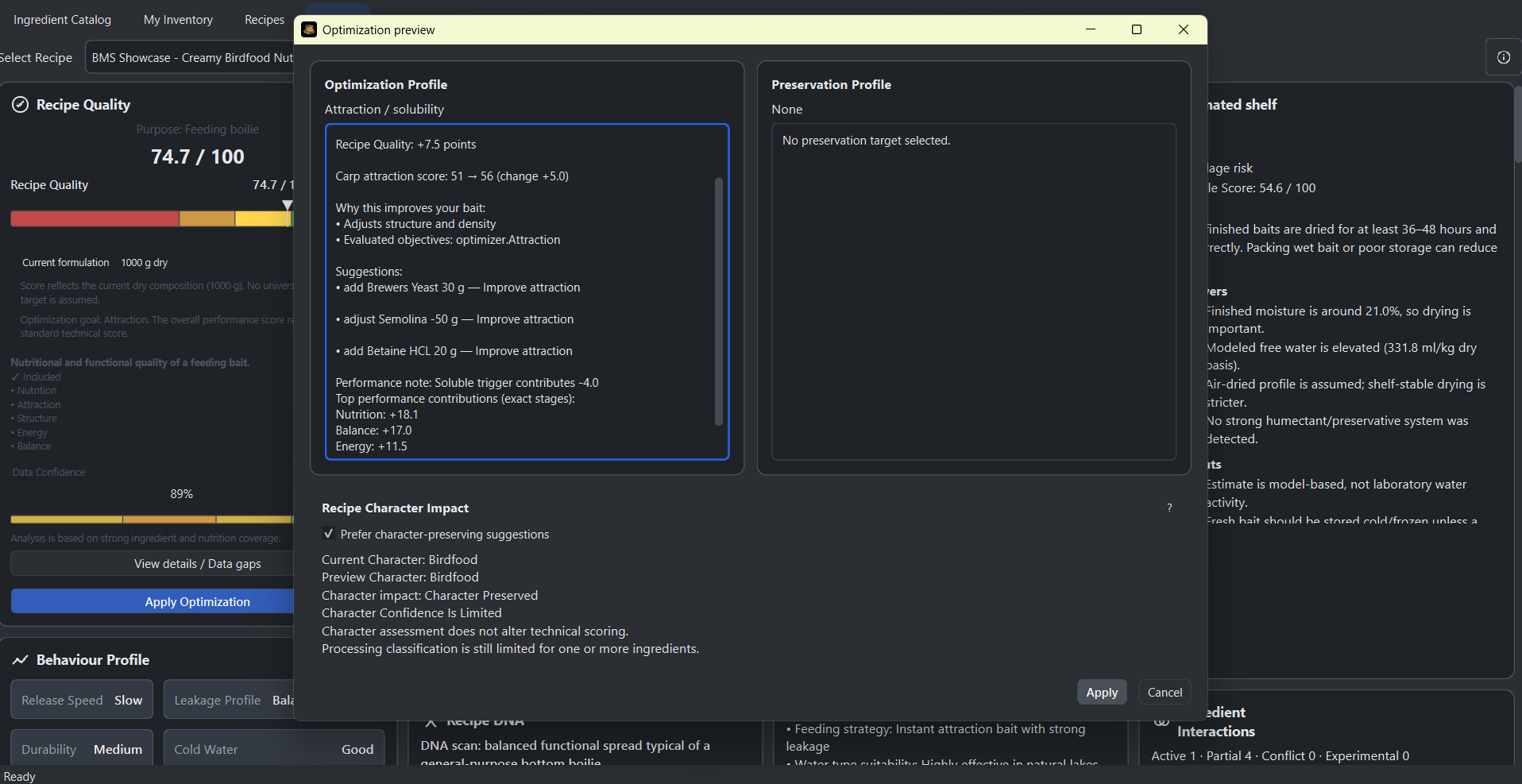
The optimization profile selector allows you to define what the system should prioritize, such as digestibility, attraction, structure, or hardness.

When running optimization, the system analyzes the full ingredient catalog and generates a preview of suggested changes. This includes ingredient adjustments and expected performance improvements.

The optimization preview shows score improvements, diagnostics, and required ingredients. Changes are only applied after confirmation, ensuring full control over the formulation.

Workflow

The Insights tab connects analysis and optimization into a single workflow. It allows you to evaluate a recipe, identify weaknesses, simulate behaviour, and generate improvements without altering the original formulation until you choose to apply changes.

Compare

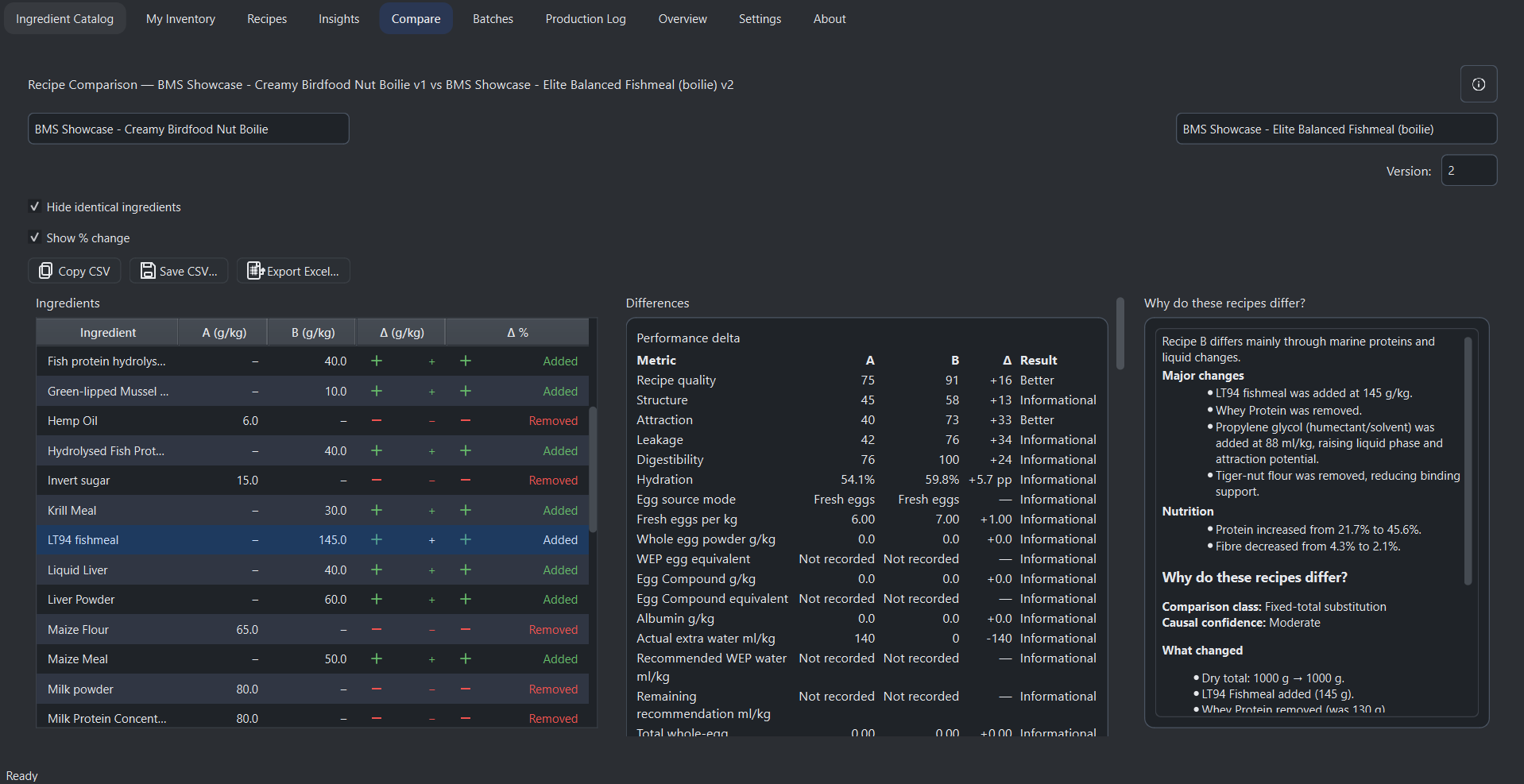
The Compare tab allows side-by-side analysis of two recipes, including different versions of the same recipe. It is designed to identify formulation differences, track development changes, and evaluate the impact of adjustments before production.

Two recipes are selected using dropdown menus, with optional version selection for each. When comparing the same recipe, the system automatically pairs older and newer versions, making it possible to track formulation evolution over time.

How it works

All recipes are normalized to one kilogram to ensure consistent comparison. Ingredients from both recipes are automatically aligned by identity, allowing direct comparison even when compositions differ. Missing ingredients are clearly identified as added or removed.

The main table displays ingredient quantities for both recipes together with absolute and percentage differences. Positive changes are highlighted in green, while negative changes are shown in red. The system automatically identifies the ingredient with the largest change and highlights it for quick analysis.

Filtering and visualization

Identical ingredients can be hidden to focus only on changes, and percentage change display can be toggled depending on the desired level of detail. Sorting allows quick identification of the most significant formulation differences.

Totals and formulation impact

The system calculates total differences in dry weight, liquid phase, egg content, hydration, and cost per kilogram. These values provide insight into how the formulation has changed functionally and economically.

A change severity indicator evaluates whether the difference between recipes is minor, moderate, or major based on ingredient shifts, formulation balance, and cost impact.

Functional shift analysis

The Compare tab evaluates how changes affect the behaviour of the bait. It detects shifts in texture, shelf life, and seasonal performance by comparing predictions between both recipes. This helps identify whether a formulation change alters the practical behaviour of the bait.

Additional drift detection warns when multiple core parameters change simultaneously, indicating a potential loss of formulation stability.

Change summary

A summary panel provides a quick overview of the comparison, including the number of added and removed ingredients, the largest increases and decreases, and the overall direction of formulation change.

Optimization comparison

The system compares optimization diagnostics between both recipes and identifies newly introduced issues as well as resolved ones. This allows you to evaluate whether a formulation change improves or degrades the recipe from an optimization perspective.

Export and reporting

Comparison results can be copied to the clipboard, saved as CSV, or exported as a professional Excel report. The Excel export includes a fully formatted comparison table, summary statistics, and cost analysis, making it suitable for documentation and production planning.

The Compare tab provides a complete overview of formulation differences, allowing you to understand not only what changed, but also how those changes affect performance, cost, and stability.

Batches

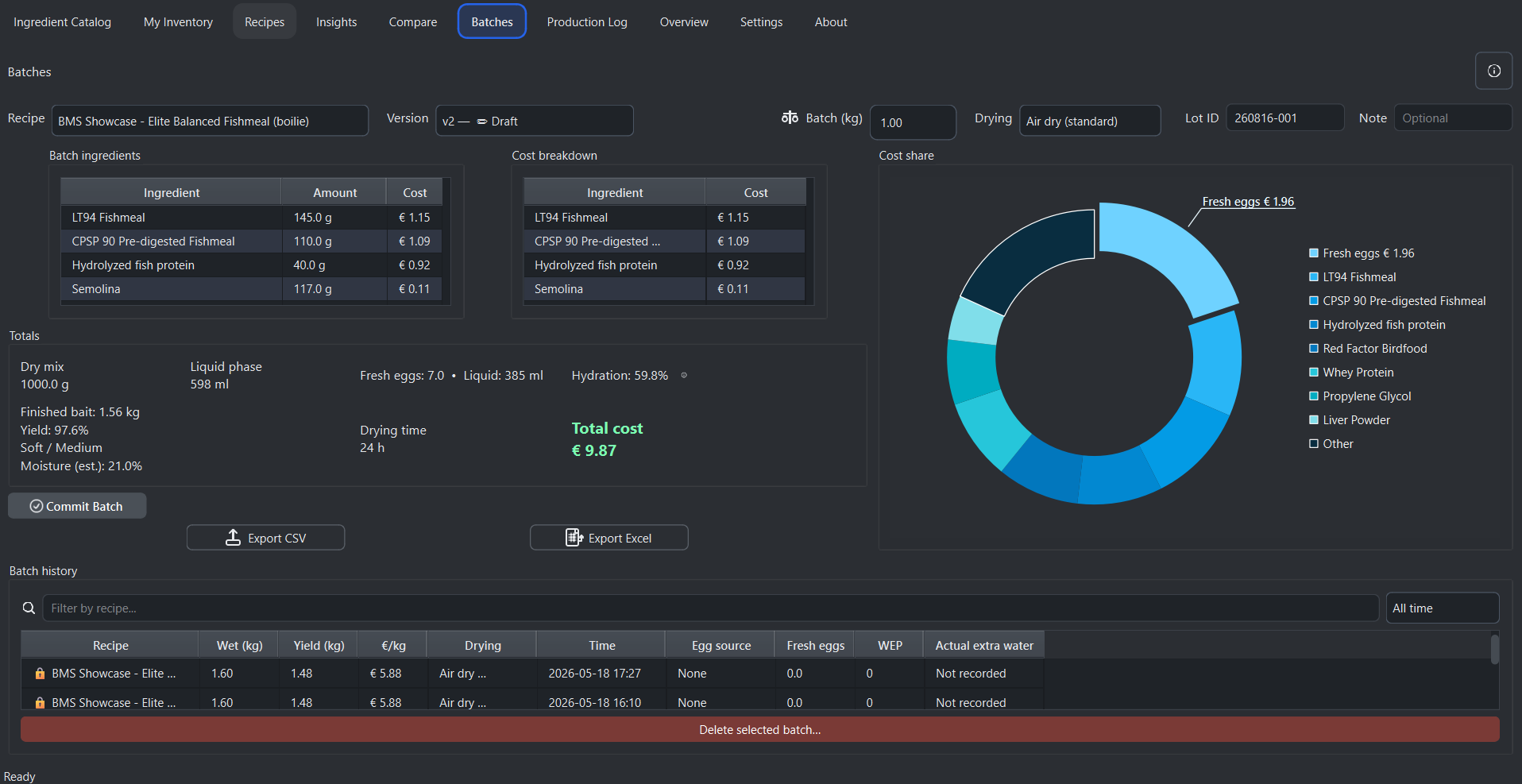
The Batches tab is designed for real production, allowing you to scale recipes, calculate exact ingredient usage, track costs, and manage manufacturing workflows with full traceability.

A recipe is selected from the dropdown and automatically linked to its current formulation, including hydration, egg usage, and cost data. The batch size is defined in kilograms, and all ingredient amounts scale precisely based on the selected weight.

Production setup

The system provides control over batch size, drying profile, and production metadata. Drying profiles such as air drying, freezer bait, dehydrator, or shelf-stable hard directly influence yield, drying time, and final bait characteristics.

Each batch includes a unique lot identifier and optional notes for traceability. Lot IDs are generated automatically based on date and sequence, ensuring consistent production tracking.

Ingredient scaling and cost calculation

All ingredients are scaled automatically from the recipe to the selected batch size. The system calculates precise quantities for dry ingredients, liquids, and eggs, including additional water where applicable.

A dedicated cost breakdown table shows the contribution of each ingredient, while a visual chart highlights the most expensive components. Total production cost is calculated in real time, including eggs and liquid phases.

Production totals and yield estimation

The totals dashboard provides a complete overview of the batch, including dry mix weight, liquid phase volume, egg usage, hydration percentage, estimated finished bait weight, drying time, and total cost.

Finished yield is calculated based on drying profile and moisture loss. The system estimates realistic output weight after drying, allowing accurate production planning.

Smart production insights

The system analyzes the recipe and predicts texture, durability, and softness of the finished bait. Shelf-life risk is evaluated based on moisture content and hydration levels, with guidance on safe storage duration and stability.

Drying time is estimated dynamically, and seasonal performance indicators help understand how the bait will behave under different conditions.

Batch commitment and inventory integration

When a batch is committed, ingredient quantities are deducted directly from inventory. The system performs validation to ensure all ingredients are available and that the recipe is based on up-to-date inventory data.

Committed batches represent final production records and cannot be modified. This ensures accurate tracking of material usage and production history.

Batch history and traceability

All committed batches are stored in a structured history table. Each record includes recipe version, batch size, finished yield, cost per kilogram, drying profile, timestamp, lot ID, and operator information.

Selecting a batch loads a read-only production snapshot, allowing full review of ingredient usage, costs, and production parameters at the time of manufacturing.

Filtering and reporting

Batch history can be filtered by recipe name or time period, including today, last seven days, and last thirty days. This allows fast access to recent production runs.

Batch data can be exported to CSV or Excel, including full production details, cost analysis, and traceability information, making it suitable for documentation, accounting, and quality control.

Production limits and licensing

The standard edition allows a limited number of batch records, while the Pro version unlocks full manufacturing capabilities, including unlimited batch production, inventory integration, and advanced tracking features.

The Batches tab transforms recipe formulation into a complete production workflow, bridging the gap between design and real-world bait manufacturing.

Production Log

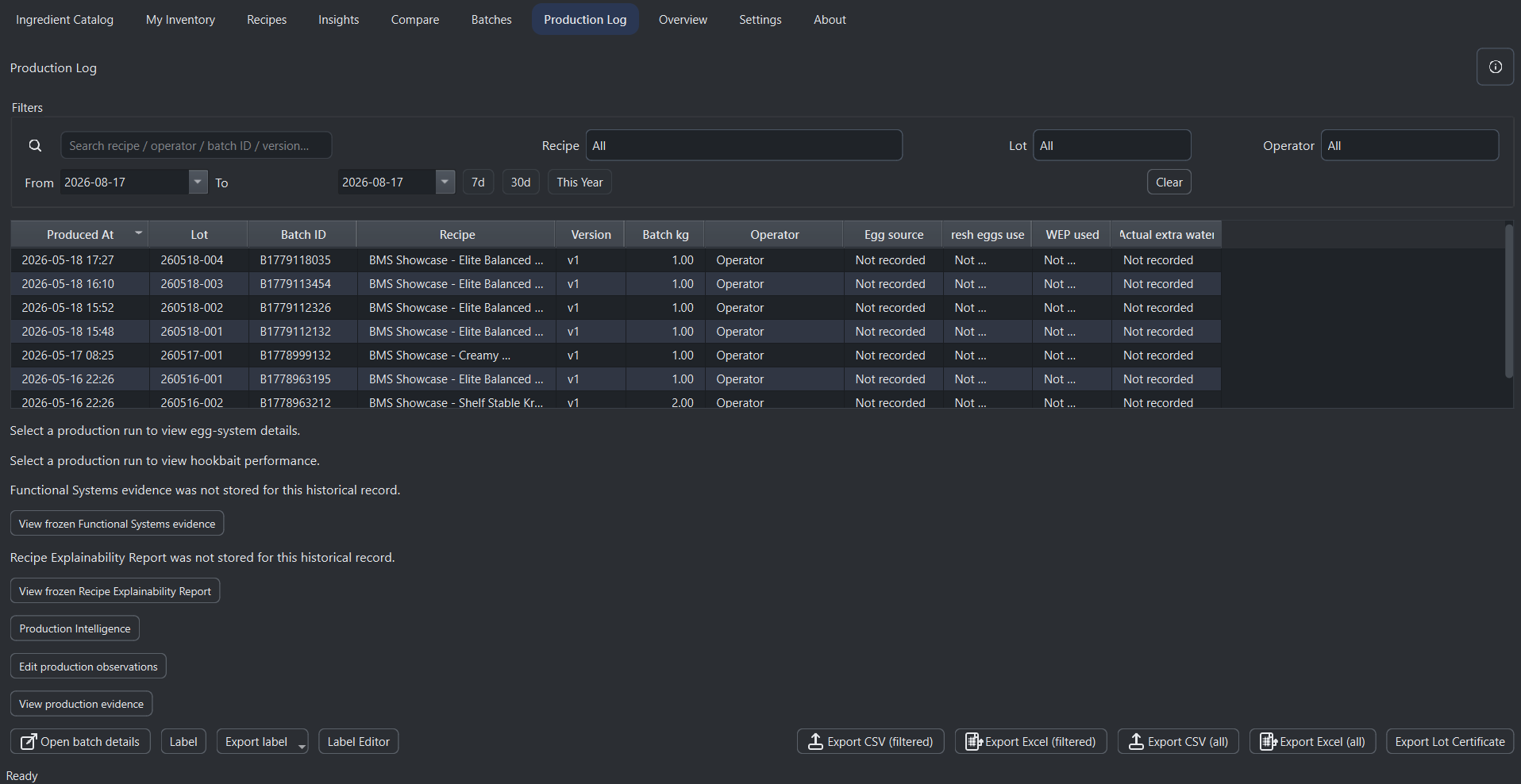
The Production Log tab is the central record of all completed batches. Every time a batch is committed, a production entry is created automatically, ensuring full traceability of manufacturing activity.

Each entry stores key production data including date and time, batch ID, lot identifier, recipe name and version, batch weight, and operator. This creates a reliable history of all production runs for auditing, quality control, and documentation.

Search and filtering

The system provides advanced filtering tools to quickly locate production runs. Entries can be searched by recipe name, operator, batch ID, or version, and filtered using dropdown selectors.

Date filtering allows selection of custom ranges, while quick filters such as last seven days, last thirty days, or the current year provide instant access to recent production data.

Structured production table

All production runs are displayed in a sortable table, ordered by production time. Each row represents a completed batch and includes full identification data for traceability.

Selecting an entry allows direct access to the corresponding batch snapshot, enabling detailed review of ingredient usage, costs, and production parameters at the time of manufacturing.

Traceability and accountability

The Production Log links each batch to a specific operator and recipe version, ensuring accountability across production processes. Lot identifiers provide an additional layer of tracking for quality control and product consistency.

This structure allows complete traceability from raw ingredients to finished bait, making it suitable for professional manufacturing workflows.

Export and reporting

Production data can be exported to CSV or Excel formats, either as a full log or filtered dataset. This allows generation of reports for accounting, audits, or operational review.

A dedicated export option generates a lot certificate in PDF format, including key production details such as recipe, batch weight, operator, and production date. This can be used for documentation and quality assurance.

Workflow integration

The Production Log is automatically connected to the Batches system. Once a batch is committed, it becomes part of the production history without requiring additional input.

This creates a seamless workflow from recipe design to production and record keeping, ensuring that all manufacturing activity is documented consistently.

Professional production tracking

The Production Log transforms batch creation into a fully traceable production system. It enables structured record keeping, efficient reporting, and complete visibility over manufacturing operations.

Overview

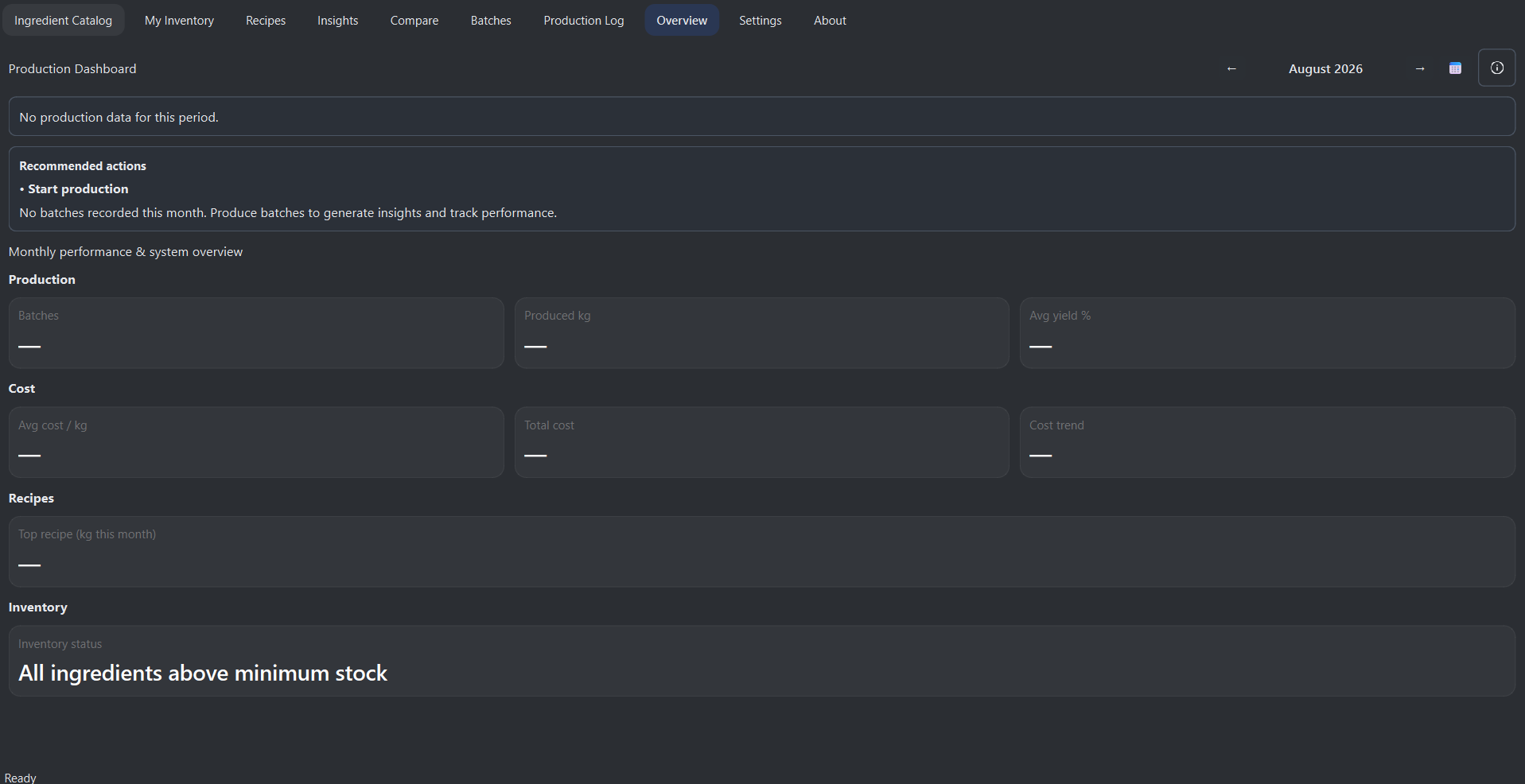
The Overview tab provides a high-level dashboard of your production activity, summarizing key performance metrics and system status in a single view.

The dashboard is organized by month, allowing you to review production performance over time. A selector at the top lets you switch between available months based on recorded production data.

Production metrics

The system calculates total batches produced, total kilograms manufactured, average production cost per kilogram, and total production cost for the selected month. These values are derived directly from production log data and reflect real manufacturing activity.

All metrics update dynamically when a different month is selected, providing a clear overview of how production performance changes over time.

Top recipe analysis

The dashboard identifies the most produced recipe for the selected month and displays its total output in kilograms. This helps determine which formulations are most frequently used in production and highlights key products in your bait program.

Inventory status

The system continuously monitors inventory levels and counts how many ingredients are below their defined minimum stock levels. This provides a quick overview of stock health and helps identify potential supply issues before production is affected.

If all ingredients are above minimum stock, the system confirms that inventory is in a healthy state. Otherwise, it displays the number of ingredients that require attention.

Data integration

All dashboard values are calculated from production log entries and inventory data. This ensures that the overview reflects real usage, real costs, and actual production results rather than estimates.

Business insight

The Overview tab transforms raw production data into actionable insight. It allows you to track output, monitor cost efficiency, identify top-performing recipes, and maintain control over inventory health from a single dashboard.